

Holds
- A hold covers the whole store. More than one can apply at once, and sending starts only when every one is clear.
- Each hold lifts by itself when its cause clears. There is no override.
- Some causes need you first, such as a DNS record or a Shopify plan. Waiting alone doesn’t fix those.
- A campaign going out when a hold starts carries on once it lifts, with no resume needed. Its 48-hour time limit keeps counting.
- A scheduled campaign waits up to 6 hours past its set time. After that it returns to draft and needs a new approval.
get_status under holds.
Not a hold, but sending still stops
- Before the first passing domain check, nothing goes out.
get_statusshowsblocking_domain_check: true. See Connect your sending domain. - A sender stop is a pause, not a hold: PostShiba stopped your domain or account. Flows pick up again by themselves once PostShiba recovers. A campaign it paused needs a fresh approval to resume.
- PostShiba account state shows on Settings > Sending limits. Waiting means PostShiba hasn’t approved your account yet. Suspended or Held means it stopped your mail. Messages stay queued either way. Contact PostShiba to find out why.
One campaign or flow step, not the store
OpenEmail pauses a single campaign by itself when something goes wrong with it. While a campaign goes out, its bounces, blocks and complaints are counted about every 5 minutes, over all messages accepted since it started or resumed and over the latest 10,000.
Any of these needs a fresh approval to resume. In a flow, a refused email stops only that step until an approved version replaces it.
Sending limits
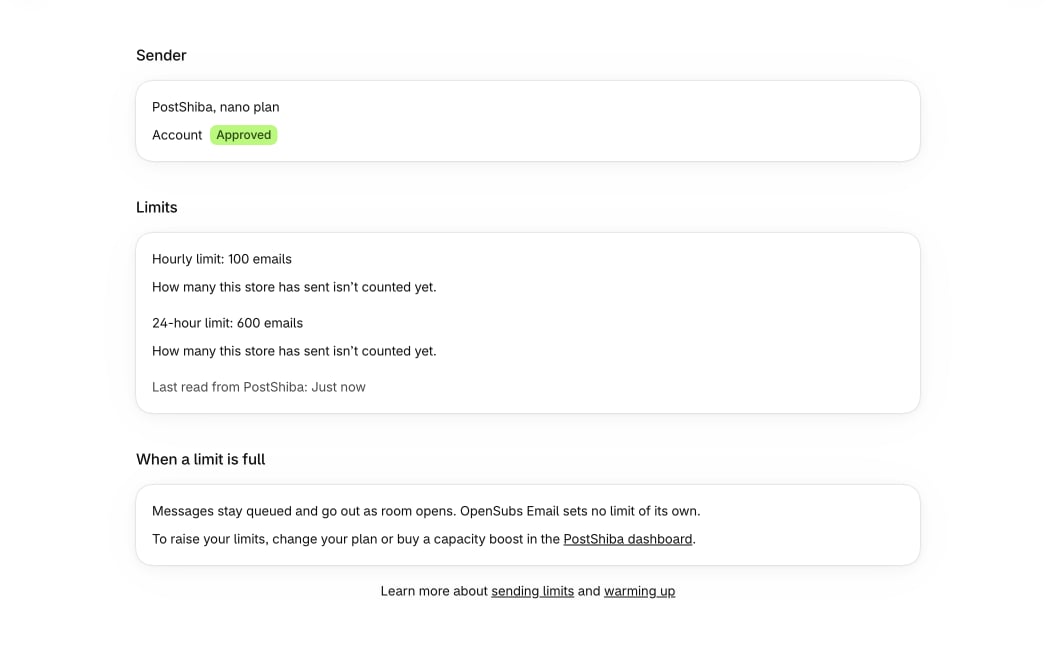
Your sender sets the limits. OpenEmail follows them and sets none of its own.- Two limits. Each PostShiba plan has an hourly limit and a 24-hour limit. Both are rolling: the last 60 minutes and the last 24 hours, not the clock hour or the calendar day.
- The hourly pace. Sending stops at 95% of the hourly limit. With a limit of 1,000 an hour, sending waits at 950, and the page shows 0 left. The 24-hour limit is used in full.
- When room opens. Room opens as your oldest email in the last 60 minutes leaves the window. A limit that filled at 10:50 opens at about 11:51, not 11:00. When a 24-hour limit fills, the page can’t say when room opens.
- Shared limits. A PostShiba limit belongs to your cluster, so other mail sent on the same cluster uses it too.
- No limits. A sender without limits shows No hourly or daily limit. Then the only pace is how many messages are in flight at once.
get_status.
Warm-up
A higher limit doesn’t make a new sending domain trusted. Mailbox providers judge your domain by how people respond to its mail.- PostShiba keeps its shared sending addresses warm, so good delivery starts with the first message. Your domain’s own reputation is yours to build.
- Send the first campaigns to your most engaged contacts: recent buyers and people who opened or clicked lately.
- Cap each send with the campaign’s recipient limit, and raise it while bounces and complaints stay low. When a limit cuts a list, the most engaged contacts go first.
- When a campaign is more than twice the most your sender was handed in one day over the past 30 days, its approval page warns you. You can still approve it.